
This post talks about the use of Enterprise Application Management (EAM) also referred to as the Enterprise App Catalogue.
EAM is a bolt on available for Intune which provides an additional mechanism for deploying applications to users and devices.
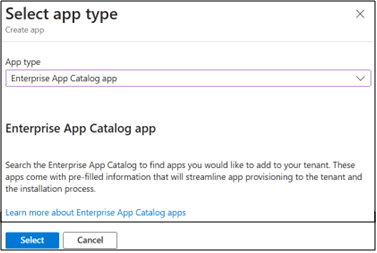
The image above captures the EAM option in the Intune portal.
The main difference with EAM compared to other deployment methods such as Win32 apps, is that it leverages a catalogue of pre-packaged applications created by Microsoft, this means that an application deployed using EAM will always be deployed to end users and devices using the latest version available from the catalogue.
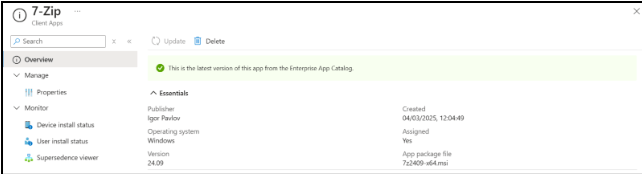
The image above captures an EAM application once created in the Intune portal.
This ensures that your applications within Intune are easily updated by providing an easy ‘update’ button, which updates the package quickly and easily, ensuring you are not running the risk of having old outdated versions of apps being deployed to your environment whether automatically or via the company portal.
This is of course assuming the required applications are available in EAM however Microsoft are always adding new applications to the catalogue. Plus if you couple EAM with applications from the Windows Store, together this maybe a great approach for your Intune environment, reducing potential security risks from deploying out-of-date applications whilst reducing the time taken to regularly review and update any MSI packages or replace any Win32 packages with the latest versions.
To note EAM is licensed on a per-user basis, which correct at the time of writing, each license costs £1.10 per user per year.
Hope this helps and thanks for reading!
